
Key takeaways
- A cleaning booking app is really three products on one backend: a customer app, a cleaner app and an admin platform.
- Live, transparent pricing is the feature that turns visitors into bookings, so build the pricing engine before anything else.
- Ship in phases: fix demand (booking and pricing) first, then supply (cleaners, dispatch and payouts).
- Trust features such as start and finish codes, live tracking and SOS protect customers, cleaners and the business at once.
Most cleaning businesses start the same way: a website, a booking form and a group chat. It works until it doesn't. Prices are quoted by hand, cleaners are dispatched by phone, and nobody can see which jobs actually happened. This guide covers what a modern home cleaning booking platform needs, the order to build it in, and the decisions that matter most. It uses AMAID.co, a US cleaning marketplace we rebuilt in three phases, as the worked example.
What a cleaning booking platform actually includes
People ask for "an app", but a working cleaning marketplace has four parts that share one database and one set of rules:
- A booking website, because many first-time customers will never install an app.
- Customer apps for iOS and Android, for repeat bookings, subscriptions and live updates.
- A cleaner app, so the people doing the work can claim jobs, navigate, check in and get paid.
- An admin platform, where the team controls services, prices, dispatch and payouts.
Treat these as separate tools and they drift apart: a price changed in one place is wrong in another. Build them on one platform and a change in the admin shows up everywhere at once.
Customer features that drive bookings
- Live pricing. The customer picks a service, the hours and the number of cleaners, and sees the price update as they choose. Hidden prices are the most common reason a booking form doesn't convert.
- A clear service catalog: standard, deep, move-in and move-out, office, short-term rental turnovers, each with its own duration and price.
- Dates and arrival windows instead of exact times, which are easier for the business to honor.
- Subscriptions: weekly, every two weeks, monthly or custom days, with a discount for committing. Recurring revenue is what makes a cleaning business stable.
- Add-ons and instructions (supplies, laundry, a note about the building's entry) and practical toggles such as pets at home.
- One-page checkout. On AMAID.co, details, date and payment sit on a single page and a booking takes under sixty seconds.
- Live updates: a notification when the cleaner is on the way, and the cleaner's live location during the trip.
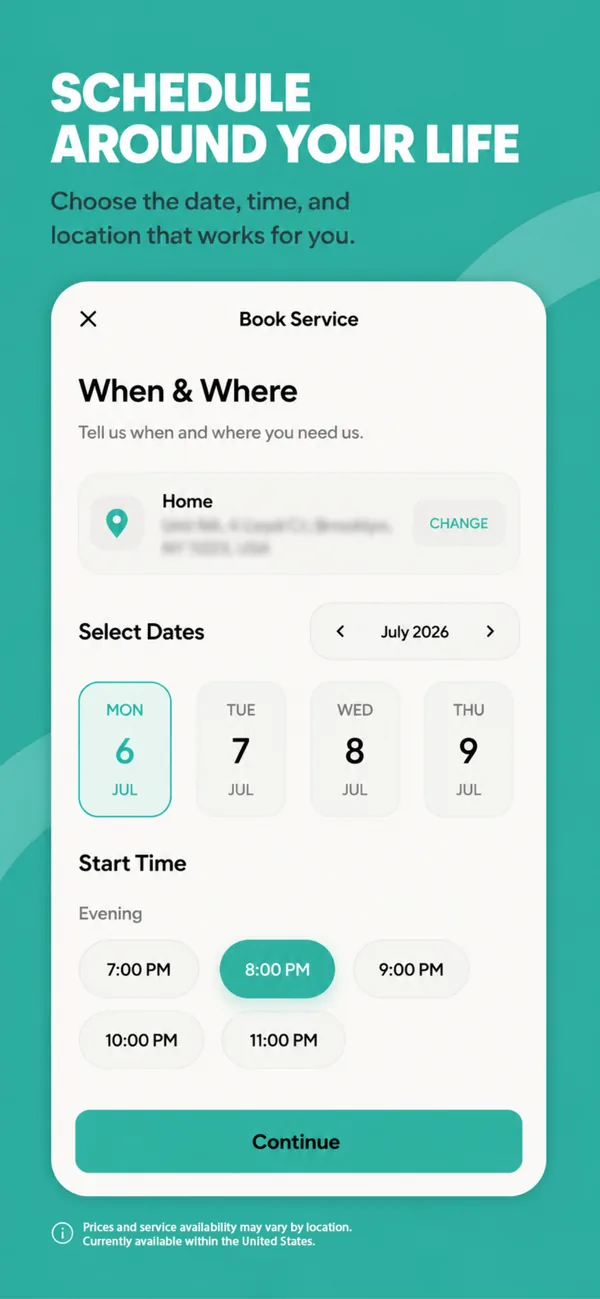
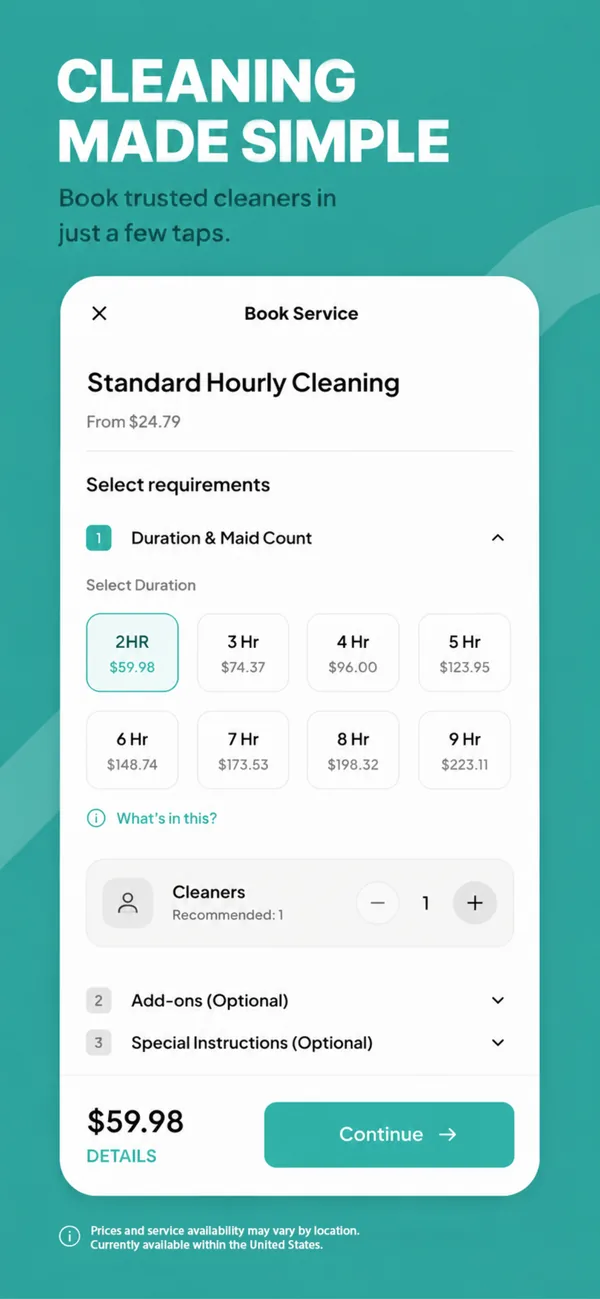
Booking in the AMAID customer app: choose when and where, then hours and cleaners with a live price.
Cleaner features that keep the work running
- Onboarding in the app, including identity details and a bank account for payouts. On AMAID this runs through Stripe.
- A job board with open jobs listed by day, each claimed with one tap.
- A departure checklist (supplies, uniform, location sharing) before every trip, which also tells the customer the cleaner is on the way.
- Start and finish verification. The job starts only with a code from the customer, and a second code closes it. Disputes about whether a clean happened largely disappear.
- Earnings and tips in one place, so cleaners don't have to ask the office.
- An SOS button that alerts the safety team with the cleaner's location.
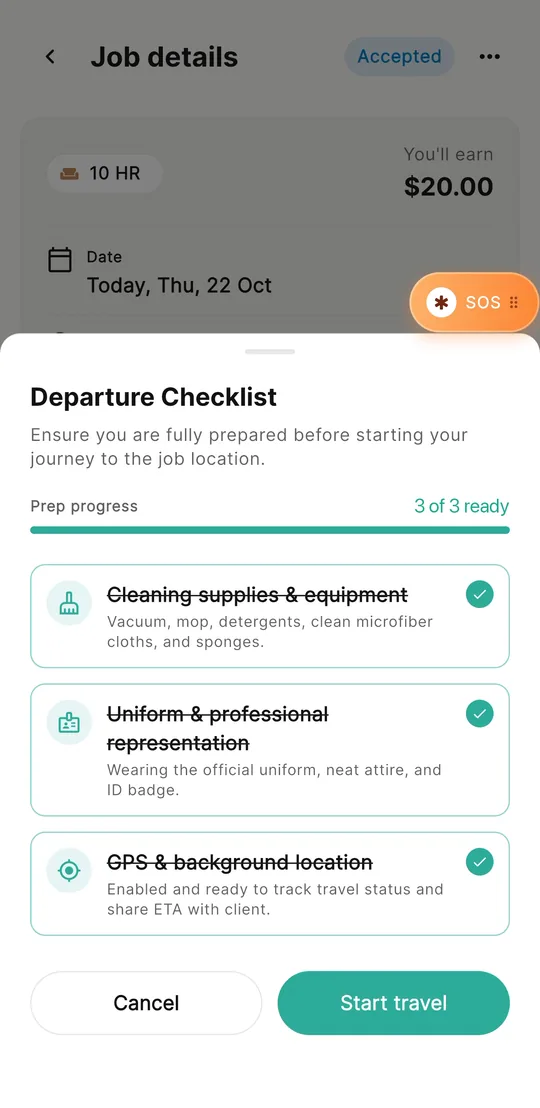
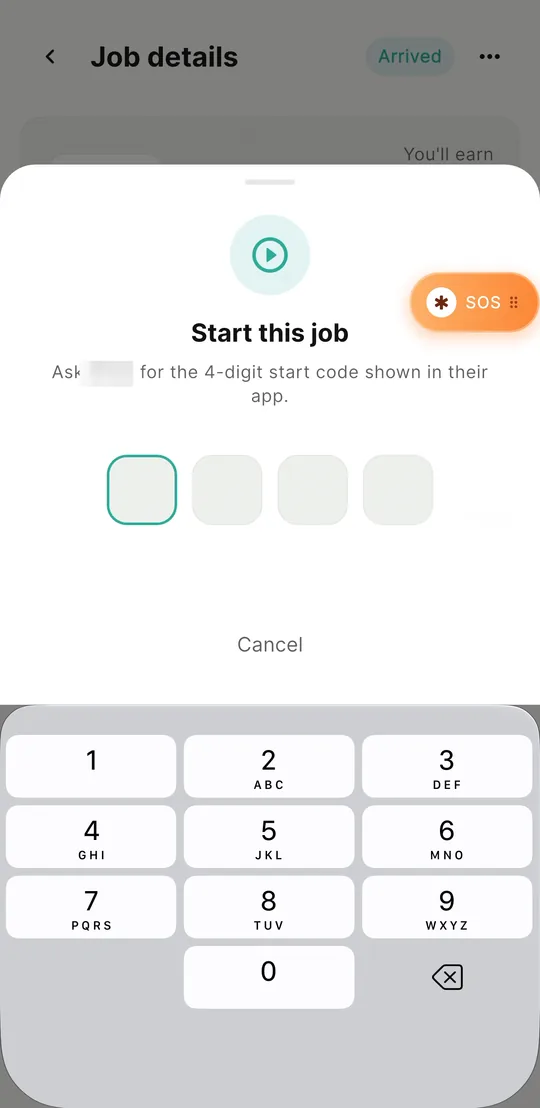
The AMAID cleaner app: a checklist before travel, and the customer's code to start the job.
Admin features that let the team run the business
- Service management without a developer: create a service and set its duration, crew size and cleaner pay.
- Location-based pricing. Draw a pricing boundary on a map. AMAID's admin goes down to a single building, which matters when one complex is cheaper or harder to serve than the next.
- Coupon rules that target a user, a building, a service, a role or a crew size, rather than one code for everyone.
- Dispatch tools: a live map of cleaners, a search for the nearest free cleaner to an address, and a schedule of every booking.
- Payouts released to cleaners in one click.
- Chat and alerts between staff, cleaners and customers, with SOS alerts surfacing instantly.
Build it in phases
You don't need all of this on day one, and you shouldn't wait for all of it. The order that worked for AMAID was to fix demand first and supply second, launching each phase on its own:
| Phase | What ships | Problem it solves |
|---|---|---|
| 1 | Booking website with live pricing, one-page checkout and subscriptions | Visitors who don't book because they can't see the price |
| 2 | iOS and Android customer apps, plus admin control of services, location pricing and coupons | Repeat customers, and prices changing without a developer |
| 3 | Cleaner app, dispatch, live tracking, payouts and SOS | Operations that no longer scale by phone and spreadsheet |
Each phase earned its keep before the next began, and each one targeted the bottleneck the business actually had at that moment.
Decisions that matter most
Website first or app first?
Usually website first. New customers find you through search and ads, and they book on the web. Apps pay off for repeat customers and subscriptions, so they make the most sense once people are coming back.
Native or cross-platform apps?
For booking flows, forms and maps, a well-built cross-platform app can feel native and halves the work across iOS and Android. Fully native Swift and Kotlin make sense when the app leans heavily on the device. We compare the options in React Native vs Flutter vs native.
How should pricing work?
Model prices as data the admin can change: base price per service, price per hour, crew size, location rules and coupon rules. If a price lives in the app's code, every change becomes a release.
How do payments and payouts work?
A cleaning marketplace collects from customers and pays cleaners, which brings identity checks, bank details and tax information. A payments platform built for marketplaces, such as Stripe, handles cleaner onboarding and payouts so you never store bank details yourself.
What about trust and safety?
Plan it from the start: verification codes for job start and finish, live location during trips, an SOS flow, and clear rules for who can see a customer's address and when.
Common mistakes
- Building the cleaner app before customers can book easily.
- Hard-coding prices, services or service areas.
- Launching apps without an admin, so the team still works from spreadsheets.
- Asking for payment details before showing the price.
- Leaving safety features for "later".
What drives the cost
The biggest cost drivers are how many of the four parts you build at once, how flexible the pricing rules need to be, whether you need live tracking and in-app chat, and how payouts work. Phasing the build keeps each step affordable and lets real usage decide what comes next. If you'd like an estimate for your own scope, tell us what you're planning.
Frequently asked questions
What features does a cleaning booking app need?
At minimum: a service catalog, live pricing by hours and cleaners, date and arrival-window scheduling, online payment and booking notifications. Most growing businesses then add subscriptions, a cleaner app with job claiming and check-in, and an admin for prices, dispatch and payouts.
Should a cleaning business build a website or an app first?
Usually the website first, with live pricing and a short checkout, because most new customers find and book on the web. Customer apps pay off once repeat bookings and subscriptions grow.
How do cleaners get paid in a cleaning marketplace app?
Cleaners connect a bank account during onboarding through a marketplace payments platform such as Stripe. The business then releases payouts for completed jobs, ideally from the admin in one click.
How do you prove a cleaning job actually happened?
Use verification codes: the cleaner enters a code from the customer to start the job and a second code to finish it, backed by live location during the trip. Disputes about whether a clean took place largely disappear.
Building a booking or marketplace app? See how we built AMAID.co, or talk to an engineer about your own platform.